
How to Use Google Search Console for SEO?

If you want to improve your website’s visibility and performance on Google, one of the most powerful (and free) tools you can use is Google Search Console (GSC). It provides valuable insights into how your site appears in search results, what keywords drive traffic, and what technical issues might be holding your rankings back.
Whether you’re new to SEO or an experienced marketer, learning how to use Google Search Console effectively can give you a serious advantage in your SEO marketing strategy.
What Is Google Search Console?
Google Search Console is a free web service by Google that helps you monitor, maintain, and troubleshoot your site’s presence in search results.
It doesn’t directly affect your rankings, but it gives you the data and tools you need to optimize your SEO marketing efforts — from keyword tracking to indexing issues.
Some of the key things you can do with GSC include:
- Checking which queries bring traffic to your site
- Monitoring your site’s clicks, impressions, and average position
- Submitting sitemaps for indexing
- Identifying and fixing technical SEO problems
- Reviewing backlinks and internal linking performance
How to Set Up Google Search Console
Before you start using GSC for SEO, you need to set it up. Here’s how:
- Go to Google Search Console
- Click “Start Now” and sign in with your Google account
- Add your website property (either domain or URL prefix)
- Verify ownership — you can do this through DNS, Google Analytics, or an HTML file
- Once verified, GSC will begin collecting data about your site
Setting it up only takes a few minutes, but the insights you’ll gain over time can completely transform your SEO marketing strategy.
Understanding the Key Reports in Google Search Console
Performance Report
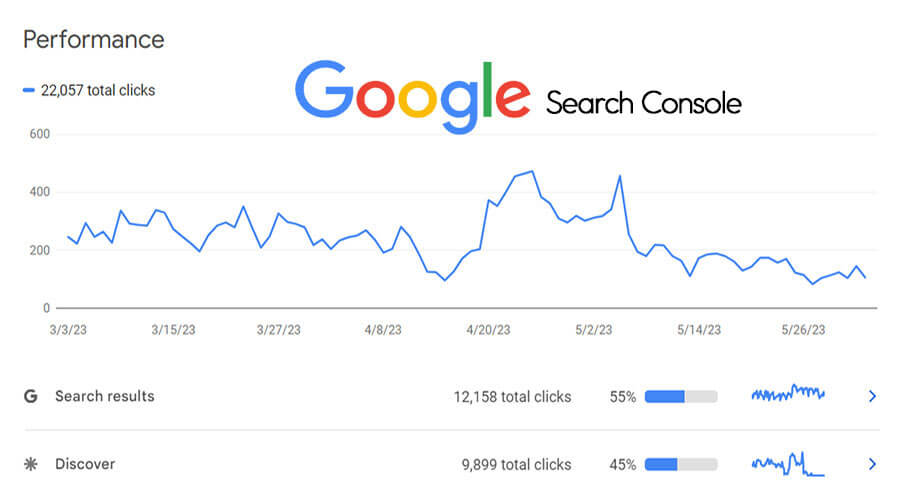
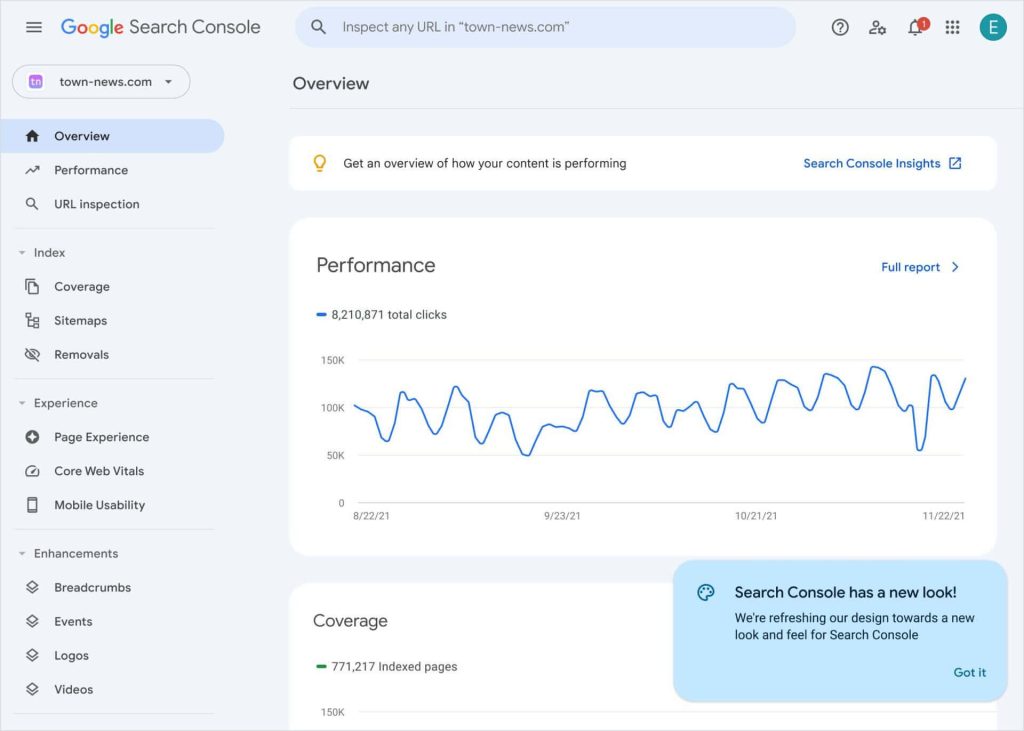
This section shows you how your site performs in Google Search. You can view:
- Total clicks: How many times people clicked on your site
- Impressions: How many times your site appeared in search results
- CTR (Click-Through Rate): The percentage of people who clicked your result
- Average position: Your ranking for specific queries
Use this data to identify which pages and keywords drive the most traffic — and where you can improve. For example, if a page ranks on page 2 for a keyword, optimize the content to move it up.
Index Coverage Report
This report shows which pages are indexed by Google and which are not.
You’ll see any errors or warnings related to your sitemap or crawl issues.
Fixing these ensures that your valuable pages are being properly indexed and visible in search results — a critical part of powerful SEO marketing.
URL Inspection Tool
With this tool, you can see how Google views a specific page.
You can:
- Check if a page is indexed
- Request indexing for new or updated pages
- Identify crawl or mobile usability issues
This is especially useful after publishing new content or making technical updates.
Sitemaps
Submitting your XML sitemap through GSC helps Google discover and crawl your website more efficiently.
Make sure your sitemap is always up to date — especially if you frequently add or remove pages.
Links Report
The Links Report shows your backlinks and internal links.
You can identify which sites link to you and which of your pages get the most links.
Strong backlinks are essential for SEO authority, while strategic internal linking improves crawlability and user experience.

Using Google Search Console for Keyword Optimization
One of the best uses of GSC is keyword analysis.
You can see exactly which search queries bring users to your site — and how you rank for them.
Look for:
- High-impression keywords with low CTR → Improve your title and meta description.
- Keywords ranking between positions 8–20 → Update your content to push them onto page one.
By consistently analyzing this data, you can refine your content and focus on powerful SEO marketing that actually drives results.
Monitoring Mobile Usability and Core Web Vitals
Google prioritizes mobile-friendly websites and good user experience.
The Core Web Vitals report in GSC measures things like:
- Page loading speed
- Interactivity
- Visual stability
Fixing these issues not only improves your SEO but also enhances the overall performance of your website.
Final Thoughts
Google Search Console is more than just an analytics tool — it’s a complete performance dashboard for your website.
From tracking keywords and fixing errors to improving site speed and indexing, GSC gives you the insights you need to build a powerful SEO marketing strategy that gets real results.
If you haven’t already connected your site to Google Search Console, now is the perfect time.
Start tracking your data, make small improvements regularly, and watch your SEO performance grow.

Leave a Reply